
 Install in Dash
 Mapbox Navigation SDK for iOS Reference
Mapbox Navigation SDK for iOS
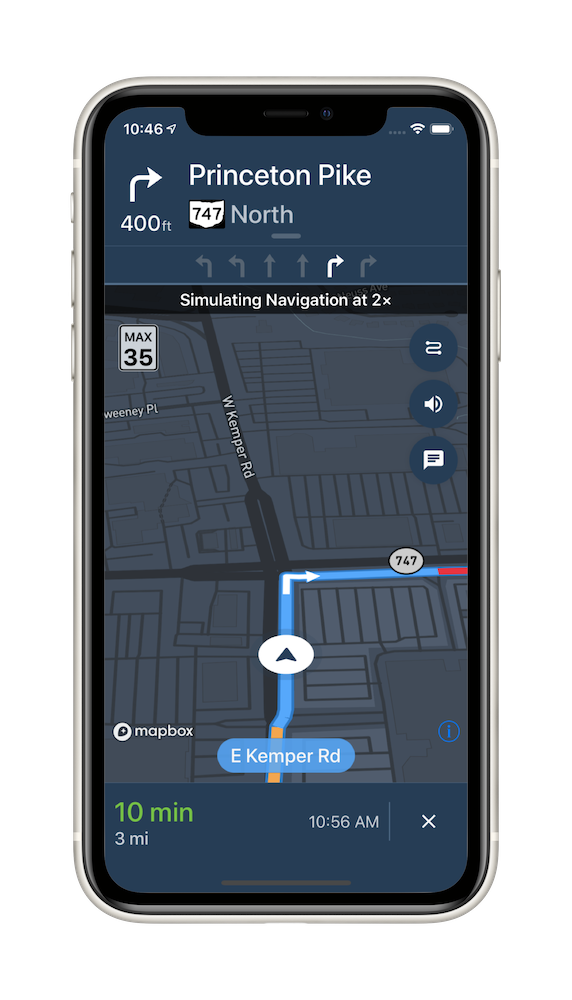
The Mapbox Navigation SDK gives you all the tools you need to add turn-by-turn navigation to your application. It takes just a few minutes to drop a full-fledged turn-by-turn navigation view controller into your application. Or use the Core Navigation framework directly to build something truly custom.
The Mapbox Navigation SDK and Core Navigation are compatible with applications written in Swift 5 in Xcode 10.2. The Mapbox Navigation and Mapbox Core Navigation frameworks run on iOS 10.0 and above.
Installation
Using Swift Package Manager
To install the MapboxNavigation framework in an application using Swift Package Manager:
Go to your Mapbox account dashboard and create an access token that has the
DOWNLOADS:READscope. PLEASE NOTE: This is not the same as your production Mapbox API token. Make sure to keep it private and do not insert it into any Info.plist file. Create a file named.netrcin your home directory if it doesn’t already exist, then add the following lines to the end of the file:machine api.mapbox.com login mapbox password PRIVATE_MAPBOX_API_TOKENwhere PRIVATE_MAPBOX_API_TOKEN is your Mapbox API token with the
DOWNLOADS:READscope.In Xcode, go to File ‣ Swift Packages ‣ Add Package Dependency.
Enter
https://github.com/mapbox/mapbox-navigation-ios.gitas the package repository and click Next.Set Rules to Version, Up to Next Major, and enter
2.1.0as the minimum version requirement. Click Next.
To install the MapboxCoreNavigation framework in another package rather than an application, run swift package init to create a Package.swift, then add the following dependency:
// Latest prerelease
.package(name: "MapboxNavigation", url: "https://github.com/mapbox/mapbox-navigation-ios.git", from: "2.1.0")
Using CocoaPods
To install the MapboxNavigation framework using CocoaPods:
Go to your Mapbox account dashboard and create an access token that has the
DOWNLOADS:READscope. PLEASE NOTE: This is not the same as your production Mapbox API token. Make sure to keep it private and do not insert it into any Info.plist file. Create a file named.netrcin your home directory if it doesn’t already exist, then add the following lines to the end of the file:machine api.mapbox.com login mapbox password PRIVATE_MAPBOX_API_TOKENwhere PRIVATE_MAPBOX_API_TOKEN is your Mapbox API token with the
DOWNLOADS:READscope.Create a Podfile with the following specification:
# Latest stable release
pod 'MapboxNavigation', '~> 2.1'
# Latest prerelease
pod 'MapboxCoreNavigation', :git => 'https://github.com/mapbox/mapbox-navigation-ios.git', :tag => 'v2.1.0'
pod 'MapboxNavigation', :git => 'https://github.com/mapbox/mapbox-navigation-ios.git', :tag => 'v2.1.0'
Run
pod repo update && pod installand open the resulting Xcode workspace.
Configuration
Mapbox APIs and vector tiles require a Mapbox account and API access token. In the project editor, select the application target, then go to the Info tab. Under the “Custom iOS Target Properties” section, set
MBXAccessTokento your access token. You can obtain an access token from the Mapbox account page. Usage of Mapbox APIs is billed together based on monthly active users (MAU) rather than individually by HTTP request.In order for the SDK to track the user’s location as they move along the route, set
NSLocationWhenInUseUsageDescriptionto:Shows your location on the map and helps improve the map.
Users expect the SDK to continue to track the user’s location and deliver audible instructions even while a different application is visible or the device is locked. Go to the Signing & Capabilities tab. Under the Background Modes section, enable “Audio, AirPlay, and Picture in Picture” and “Location updates”. (Alternatively, add the
audioandlocationvalues to theUIBackgroundModesarray in the Info tab.)
Now import the relevant modules and present a new NavigationViewController. You can also push to a navigation view controller from within a storyboard if your application’s UI is laid out in Interface Builder.
import MapboxDirections
import MapboxCoreNavigation
import MapboxNavigation
// Define two waypoints to travel between
let origin = Waypoint(coordinate: CLLocationCoordinate2D(latitude: 38.9131752, longitude: -77.0324047), name: "Mapbox")
let destination = Waypoint(coordinate: CLLocationCoordinate2D(latitude: 38.8977, longitude: -77.0365), name: "White House")

// Set options
let routeOptions = NavigationRouteOptions(waypoints: [origin, destination])

// Request a route using MapboxDirections
Directions.shared.calculate(routeOptions) { [weak self] (session, result) in
    switch result {
    case .failure(let error):
        print(error.localizedDescription)
    case .success(let response):
        guard let strongSelf = self else {
            return
        }
        // Pass the generated route response to the the NavigationViewController
        let viewController = NavigationViewController(for: response, routeIndex: 0, routeOptions: routeOptions)
        viewController.modalPresentationStyle = .fullScreen
        strongSelf.present(viewController, animated: true, completion: nil)
    }
}
Starting points
This SDK is divided into two frameworks: the Mapbox Navigation framework (MapboxNavigation) is the ready-made turn-by-turn navigation UI, while the Mapbox Core Navigation framework (MapboxCoreNavigation) is responsible for the underlying navigation logic.
Mapbox Navigation
NavigationViewController is the main class that encapsulates the entirety of the turn-by-turn navigation UI, orchestrating the map view, various UI elements, and the route controller. Your application would most likely present an instance of this class. The NavigationViewControllerDelegate protocol allows your application to customize various aspects of the UI and react to location-related events as they occur.
NavigationMapView is the map view at the center of the turn-by-turn navigation UI. You can also use this class independently of NavigationViewController, for example to display a route preview map. The NavigationMapViewDelegate protocol allows your application to customize various aspects of the map view’s appearance. PassiveLocationProvider is an optional alternative to CLLocationManager for use with any standalone MapView or NavigationMapView.
CarPlayManager is the class that manages the CarPlay screen if your application is CarPlay-enabled. It provides a main map for browsing, a search interface that can be powered by the Mapbox Search SDK for iOS or MapboxGeocoder.swift, and a turn-by-turn navigation UI similar to the one provided by NavigationViewController. Your UIApplicationDelegate subclass can conform to the CarPlayManagerDelegate protocol to manage handoffs between NavigationViewController and the CarPlay device, as well as to customize some aspects of the CarPlay navigation experience. To take advantage of CarPlay functionality, your application must have a CarPlay navigation application entitlement and be built in Xcode 10 or above, and the user’s iPhone or iPad must have iOS 12 or above installed.
Core Navigation
MapboxNavigationService is responsible for receiving user location updates and determining their relation to the route line. If you build a completely custom navigation UI, this is the class your code would interact with directly. The NavigationServiceDelegate protocol allows your application to react to location-related events as they occur. Corresponding Notifications from the NavigationService‘s RouteController are also posted to the shared NotificationCenter. These notifications indicate the current state of the application in the form of a RouteProgress object.
For further details, consult the guides and examples included with this API reference. If you have any questions, please see our help page. We welcome your bug reports, feature requests, and contributions.
Changes in version 2.1.0
Pricing
- Fixed billing issues which might affect v1.x -> v2.x migration. The update is strongly recommended. (#3626)
- Fixed and issue where paused billing trip sessions might result in requests made inside NavNative billed per request. (#3348)
Packaging
- MapboxNavigation now depends on Maps v10.1.0. (#3590)
- MapboxCoreNavigation now depends on MapboxDirections v2.1.0-rc.1. (#3590)
- MapboxCoreNavigation now depends on MapboxNavigationNative v80.x. (#3590)
Location tracking
- Added the
PassiveLocationManager.rawLocationandPassiveLocationManager.locationproperties to get the latest raw and idealized locations, respectively. (#3474) - Fixed an issue where
ReplayLocationManagerwould crash if initialized with just one location. (#3528) - Added the
ReplayLocationManager.replayCompletionHandlerproperty that allows you to loop location. (#3528, 3550) - Changed the behavior of
ReplayLocationManagerso that it doesn’t loop locations by default. (#3550) - Fixed an issue where
ReplayLocationManagerdidn’t update location timestamps when a new loop started. (#3550) - Fixed the background location update issue during active navigation when using default
.courseViewforNavigationMapView.userLocationStyle. (#3533) - Fixed an issue where
UserPuckCourseViewis trimmed when using custom frame forUserLocationStyle.courseView(_:). (#3601) - Fixed an issue where route line blinks when style is changed during active navigation. (#3613)
- Fixed an issue where route line missing traffic colors after refresh or rerouting. (#3622)
- Fixed an issue when user goes offline and the route line grows back when
NavigationViewController.routeLineTracksTraversalenabled. When the distance of user location to the route is larger than certain distance threshold, the vanishing effect of route line would stop until the new route line gets generated. (#3385)
Banners and guidance instructions
- Fixed the crash when scrolling the guidance cards while the orientation changes. (#3544)
- Added the
TopBannerViewController.lanesView,TopBannerViewController.nextBannerView,TopBannerViewController.statusViewandTopBannerViewController.junctionViewproperties. (#3575) - The
InstructionsBannerViewDelegateandTopBannerViewControllerDelegateprotocols now conform to theVisualInstructionDelegateprotocol. (#3575) - Fixed an issue where
VisualInstructionDelegate.label(_:willPresent:as:)was never called. YourNavigationViewControllerDelegateclass can now implement this method to customize the contents of a visual instruction during turn-by-turn navigation. (#3575) - Fixed an issue where certain dual- or triple-use lanes were blank in the tertiary instruction banner. (#3569, mapbox/navigation-ui-resources#26)
- Fixed an issue where dual-use slight turn lanes were sometimes depicted as normal turn lanes in the tertiary instruction banner. (#3569, mapbox/navigation-ui-resources#26)
- Setting the
WayNameView.isHiddenproperty totruenow keeps the view hidden even after the user goes onto a named road. (#3534) - Added the
WayNameView.backgroundColorandWayNameView.borderWidthproperties for customizing how the current road name is labeled. (#3534)
Map
- Added the
NavigationViewController.usesNightStyleWhileInTunnelandCarPlayNavigationViewController.usesNightStyleWhileInTunnelproperties, which allow to disable dark style usage, while traversing the tunnels. (#3559) - Added the ability to change congestion color transition sharply or softly when
NavigationMapView.crossfadesCongestionSegmentschanged during active navigation. (#3466)
Route overlay
- Fixed an issue where
NavigationMapView.showcase(_:animated:)was clipping unselected routes by renaming it to theNavigationMapView.showcase(_:routesPresentationStyle:animated:), with an optional parameter to control whether the camera fits to unselected routes in addition to the selected route. (#3556)
CarPlay
- Added the
CarPlayActivity.panningInNavigationModecase, which allows to track a state when user is panning a map view while actively navigating. (#3545) - Fixed an issue that caused the panning dismissal button to stop working on CarPlay. (#3543)
- Fixed an issue which caused the inability to see
SpeedLimitViewandCarPlayCompassViewwhen left-hand traffic mode is used on CarPlay. (#3583) - Added the
CarPlayMapViewController.wayNameViewandCarPlayNavigationViewController.wayNameViewproperties to show the current road name on CarPlay.CarPlayNavigationViewController.compassView,CarPlayNavigationViewController.speedLimitViewandCarPlayMapViewController.speedLimitVieware kept as strong references, thus available throughout the lifetime of a parent object. (#3534) - Fixed an issue when
NavigationMapView.crossfadesCongestionSegmentsenabled but congestion color transition is still sharp in CarPlay. (#3466) - Fixed an issue when incorrect padding was used for
SpeedLimitViewandCarPlayCompassViewfor right-hand traffic mode on CarPlay. (#3605) - Added the ability to extrude or highlight building on CarPlay by setting the
CarPlayNavigationViewController.waypointStyleproperty. (#3564)
Camera
- Fixed an issue where on routes with large distances between current location and next manuever camera zoom level was too low. To control navigation camera zoom level use
IntersectionDensity.averageDistanceMultipliercoefficient. (#3616)
Other changes
- Fixed a retain cycle in CarPlay implementation of a navigation map view that prevented
NavigationMapViewinstances from being deallocated after CarPlay is stopped. (#3552) - Fixed an issue where the entire route line was colored as
NavigationMapView.routeCasingColorinstead ofNavigationMapView.trafficUnknownColorwhen traffic congestion data was missing. (#3577) - Added the
SpeechSynthesizing.managesAudioSessionproperty to control if the speech synthesizer is allowed to manage the sharedAVAudioSession. Set this value to false if you want to enable and disable theAVAudioSessionyourself, for example, if your app plays background music. (#3572) - Fixed an issue when
SpeechSynthesizingDelegate.speechSynthesizer(_:willSpeak:)callback was called at the wrong moment. (#3572) - Fixed an issue where
RouteStepProgress.currentIntersectionwas always returning invalid value, which in turn caused inability to correctly detect whether specific location along the route is in tunnel, or not. (#3559) - Renamed the
Locale.usesMetricproperty toLocale.measuresDistancesInMetricUnits.Locale.usesMetricis still available but deprecated. (#3547) - Fixed an issue where the user interface did not necessarily display distances in the same units as the route by default.
NavigationRouteOptionsandNavigationMatchOptionsnow setDirectionsOptions.distanceMeasurementSystemto a default value matching theNavigationSettings.distanceUnitproperty. (#3541) - Introduced
RoutingProviderto parameterize routing fetching and refreshing during active guidance sessions.Directions.calculateWithCache(options:completionHandler:)andDirections.calculateOffline(options:completionHandler)functionality is deprecated byMapboxRoutingProvider. It is now recommended to useMapboxRoutingProviderto request or refresh routes instead ofDirectionsobject but you may also provide your ownRoutingProviderimplementation toNavigationService,RouteControllerorLegacyRouteController. Usingdirectionsproperty of listed above entities is discouraged, you should use correspondingroutingProviderinstead, albeitDirectionsalso implements the protocol. (#3261)