
 Install in Dash
 Mapbox Navigation SDK for iOS Reference
Mapbox Navigation SDK for iOS
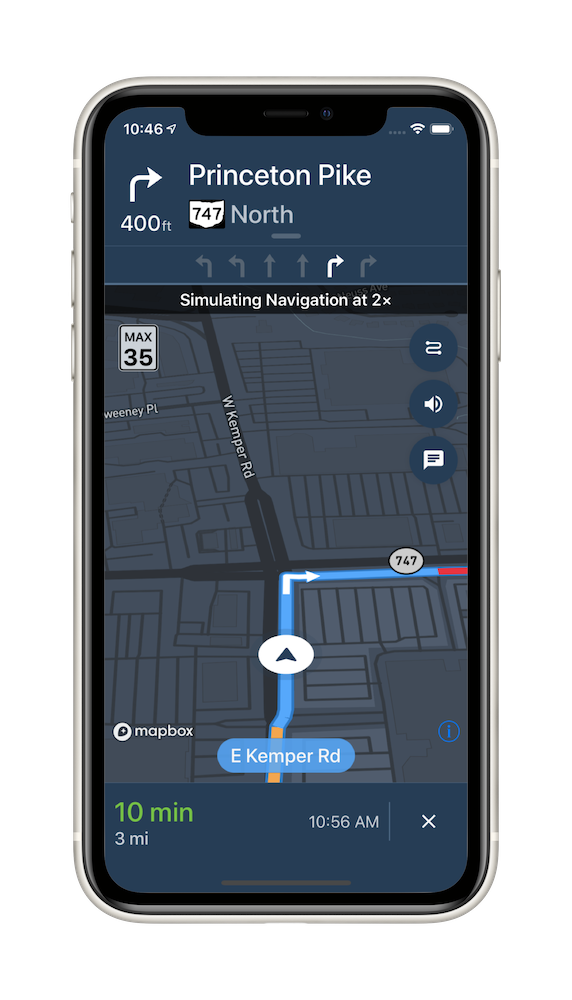
The Mapbox Navigation SDK gives you all the tools you need to add turn-by-turn navigation to your application. It takes just a few minutes to drop a full-fledged turn-by-turn navigation view controller into your application. Or use the Core Navigation framework directly to build something truly custom.
The Mapbox Navigation SDK and Core Navigation are compatible with applications written in Swift 5 in Xcode 10.2. The Mapbox Navigation and Mapbox Core Navigation frameworks run on iOS 10.0 and above.
Installation
Using Swift Package Manager
To install the MapboxNavigation framework in an application using Swift Package Manager:
Go to your Mapbox account dashboard and create an access token that has the
DOWNLOADS:READscope. PLEASE NOTE: This is not the same as your production Mapbox API token. Make sure to keep it private and do not insert it into any Info.plist file. Create a file named.netrcin your home directory if it doesn’t already exist, then add the following lines to the end of the file:machine api.mapbox.com login mapbox password PRIVATE_MAPBOX_API_TOKENwhere PRIVATE_MAPBOX_API_TOKEN is your Mapbox API token with the
DOWNLOADS:READscope.In Xcode, go to File ‣ Swift Packages ‣ Add Package Dependency.
Enter
https://github.com/mapbox/mapbox-navigation-ios.gitas the package repository and click Next.Set Rules to Version, Up to Next Major, and enter
2.0as the minimum version requirement. Click Next.
To install the MapboxCoreNavigation framework in another package rather than an application, run swift package init to create a Package.swift, then add the following dependency:
// Latest prerelease
.package(name: "MapboxNavigation", url: "https://github.com/mapbox/mapbox-navigation-ios.git", from: "2.0")
Using CocoaPods
To install the MapboxNavigation framework using CocoaPods:
Go to your Mapbox account dashboard and create an access token that has the
DOWNLOADS:READscope. PLEASE NOTE: This is not the same as your production Mapbox API token. Make sure to keep it private and do not insert it into any Info.plist file. Create a file named.netrcin your home directory if it doesn’t already exist, then add the following lines to the end of the file:machine api.mapbox.com login mapbox password PRIVATE_MAPBOX_API_TOKENwhere PRIVATE_MAPBOX_API_TOKEN is your Mapbox API token with the
DOWNLOADS:READscope.Create a Podfile with the following specification:
# Latest stable release
pod 'MapboxNavigation', '~> 2.0'
# Latest prerelease
pod 'MapboxCoreNavigation', :git => 'https://github.com/mapbox/mapbox-navigation-ios.git', :tag => 'v2.0'
pod 'MapboxNavigation', :git => 'https://github.com/mapbox/mapbox-navigation-ios.git', :tag => 'v2.0'
Run
pod repo update && pod installand open the resulting Xcode workspace.
Configuration
Mapbox APIs and vector tiles require a Mapbox account and API access token. In the project editor, select the application target, then go to the Info tab. Under the “Custom iOS Target Properties” section, set
MGLMapboxAccessTokento your access token. You can obtain an access token from the Mapbox account page. Usage of Mapbox APIs is billed together based on monthly active users (MAU) rather than individually by HTTP request.In order for the SDK to track the user’s location as they move along the route, set
NSLocationWhenInUseUsageDescriptionto:Shows your location on the map and helps improve the map.
Users expect the SDK to continue to track the user’s location and deliver audible instructions even while a different application is visible or the device is locked. Go to the Signing & Capabilities tab. Under the Background Modes section, enable “Audio, AirPlay, and Picture in Picture” and “Location updates”. (Alternatively, add the
audioandlocationvalues to theUIBackgroundModesarray in the Info tab.)
Now import the relevant modules and present a new NavigationViewController. You can also push to a navigation view controller from within a storyboard if your application’s UI is laid out in Interface Builder.
import MapboxDirections
import MapboxCoreNavigation
import MapboxNavigation
// Define two waypoints to travel between
let origin = Waypoint(coordinate: CLLocationCoordinate2D(latitude: 38.9131752, longitude: -77.0324047), name: "Mapbox")
let destination = Waypoint(coordinate: CLLocationCoordinate2D(latitude: 38.8977, longitude: -77.0365), name: "White House")

// Set options
let routeOptions = NavigationRouteOptions(waypoints: [origin, destination])

// Request a route using MapboxDirections
Directions.shared.calculate(routeOptions) { [weak self] (session, result) in
    switch result {
    case .failure(let error):
        print(error.localizedDescription)
    case .success(let response):
        guard let route = response.routes?.first, let strongSelf = self else {
            return
        }
        // Pass the generated route to the the NavigationViewController
        let viewController = NavigationViewController(for: route, routeIndex: 0, routeOptions: routeOptions)
        viewController.modalPresentationStyle = .fullScreen
        strongSelf.present(viewController, animated: true, completion: nil)
    }
}
Starting points
This SDK is divided into two frameworks: the Mapbox Navigation framework (MapboxNavigation) is the ready-made turn-by-turn navigation UI, while the Mapbox Core Navigation framework (MapboxCoreNavigation) is responsible for the underlying navigation logic.
Mapbox Navigation
NavigationViewController is the main class that encapsulates the entirety of the turn-by-turn navigation UI, orchestrating the map view, various UI elements, and the route controller. Your application would most likely present an instance of this class. The NavigationViewControllerDelegate protocol allows your application to customize various aspects of the UI and react to location-related events as they occur.
NavigationMapView is the map view at the center of the turn-by-turn navigation UI. You can also use this class independently of NavigationViewController, for example to display a route preview map. The NavigationMapViewDelegate protocol allows your application to customize various aspects of the map view’s appearance. PassiveLocationManager is an optional alternative to CLLocationManager for use with any standalone MapView or NavigationMapView.
CarPlayManager is the class that manages the CarPlay screen if your application is CarPlay-enabled. It provides a main map for browsing, a search interface powered by MapboxGeocoder.swift, and a turn-by-turn navigation UI similar to the one provided by NavigationViewController. Your UIApplicationDelegate subclass can conform to the CarPlayManagerDelegate protocol to manage handoffs between NavigationViewController and the CarPlay device, as well as to customize some aspects of the CarPlay navigation experience. To take advantage of CarPlay functionality, your application must have a CarPlay navigation application entitlement and be built in Xcode 10 or above, and the user’s iPhone or iPad must have iOS 12 or above installed.
Core Navigation
MapboxNavigationService is responsible for receiving user location updates and determining their relation to the route line. If you build a completely custom navigation UI, this is the class your code would interact with directly. The NavigationServiceDelegate protocol allows your application to react to location-related events as they occur. Corresponding Notifications from the NavigationService‘s RouteController are also posted to the shared NotificationCenter. These notifications indicate the current state of the application in the form of a RouteProgress object.
For further details, consult the guides and examples included with this API reference. If you have any questions, please see our help page. We welcome your bug reports, feature requests, and contributions.
Changes in version 2.0.0
Packaging
- The Mapbox Navigation SDK for iOS license has changed from the ISC License to the Mapbox Terms of Service. (#2808)
- You can now install MapboxNavigation using Swift Package Manager, but you can no longer install it using Carthage. If you previously installed MapboxNavigation using Carthage, use Swift Package Manager instead. (#2808)
- MapboxNavigation now depends on MapboxMaps v10.0.0-beta.18.1, MapboxNavigationNative v48.0.5. (#2944)
- MapboxNavigation depends on MapboxCommon v11.0.2. (#2930)
- MapboxCoreNavigation depends on MapboxDirections v2.0.0-beta.2 but no longer depends on MapboxAccounts. (#2808, #2829, #2837)
- MapboxNavigation and MapboxCoreNavigation require iOS 11.0 or above to run. iOS 10.x is no longer supported. (#2808)
- Xcode 12.4 or above is now required for building this SDK from source.
Map
- To gain access to Mapbox server APIs, set
MBXAccessTokenin your Info.plist.MGLMapboxAccessTokenis still supported but is now deprecated. (#2837) - Removed obsoleted
NavigationMapView.navigationMapDelegate, which was replaced byNavigationMapView.delegate. (#2808) NavigationMapView.navigationMapViewDelegatewas renamed toNavigationMapView.delegate. (#2808)NavigationViewController.mapViewwas renamed toNavigationViewController.navigationMapView. (#2808)- Removed
NavigationAnnotation. (#2808) NavigationMapView.updateCourseTracking(location:camera:animated:)no longer acceptsMGLMapCameraas parameter, and usesCameraOptionsinstead. (#2808)NavigationMapView.showsUserLocationwas removed, becauseNavigationMapViewis no longer inherited fromMGLMapView.NavigationMapView.mapViewis now exposed as public property instead. (#2808)NavigationViewController.pendingCameratype was changed fromMGLMapCameratoCameraOptions. (#2808)- Renamed public constant
Constants.MBRouteLineWidthByZoomLevelto public variableConstants.MBRouteLineWidthByZoomLevel, which now acceptsDoublefor keys and values. (#2808) - Renamed public property
MBCurrentLegAttributetoCurrentLegAttribute. (#2808) - Renamed public property
MBCongestionAttributetoCongestionAttribute. (#2808) NavigationViewController.mapViewwas renamed toNavigationViewController.navigationMapView. (#2808)NavigationMapView.highlightBuildings(at:in3D:)was renamed toNavigationMapView.highlightBuildings(at:in3D:completion:). (#2827)- Added the
NavigationMapView.showsCongestionForAlternativeRoutesproperty to show congestion levels with different colors on alternative route lines. (#2887) - Added the
NavigationMapView.navigationMapView(_:didAdd:)andNavigationViewController.navigationViewController(_:didAdd:)delegate methods, which will be called whenever final destinationPointAnnotationis added toNavigationMapVieworNavigationViewControllerrespectively. (#2961) - Added the ability to show specific route leg with color overriding. When specifying the
legIndexinNavigationMapView.show(_:legIndex:), the route line for the specific route leg would show congestion colors, while other route legs would showNavigationMapView.routeCasingColorby default. If not specified, all the route legs would show congestion colors. During turn-by-turn navigation, the default specified route leg is the current route leg. The route leg colors could be overridden byNavigationMapView.routeCasingColorand the congestion colors. (#2833)
Location tracking
PassiveLocationManagernow conforms toLocationProviderprotocol instead ofMGLLocationManager. (#2808)- Type of
PassiveLocationManager.delegateproperty was changed fromMGLLocationManagerDelegatetoLocationProviderDelegate. (#2808) PassiveLocationManager.accuracyAuthorization()was replaced withPassiveLocationManager.accuracyAuthorizationproperty, which now returnsCLAccuracyAuthorizationinstead ofMBNavigationAccuracyAuthorization. (#2808)- While a
RouteController,PassiveLocationDataSource, orPassiveLocationManageris tracking the user’s location, you can get notifications about location changes that indicate relevant details in the electronic horizon – the upcoming portion of the routing graph – such as the names of cross streets and upcoming speed limit changes. To receive this information, observe theNotification.Name.electronicHorizonDidUpdatePosition,Notification.Name.electronicHorizonDidEnterRoadObject, andNotification.Name.electronicHorizonDidExitRoadObjectnotifications. Use theRouteController.roadGraphorPassiveLocationDataSource.roadGraphproperty to get more information about the edges contained in these notifications. Optionally set theRouteController.electronicHorizonOptionsorPassiveLocationDataSource.electronicHorizonOptionsproperty to configure the extent of electronic horizon calculations. (#2834) - Fixed a potential hang when
PassiveLocationDataSourcefails to download routing tiles. (#2808) - Fixed an issue where
RouteControllerorPassiveLocationDataSourcesometimes snapped the user’s location assuming a path that violated a turn restriction. (#2808) - Improved performance and decreased memory usage when downloading routing tiles. (#2808)
- Renamed
PassiveLocationManager.startUpdatingLocation(completionHandler:)toPassiveLocationManager.startUpdatingLocation(). This method now runs synchronously likeCLLocationManager.startUpdatingLocation(). (#2823) - Added the
RouteController.historyDirectoryURLproperty andRouteController.writeHistory(completionHandler:)method for recording details about a trip for debugging purposes. (#2930)
Camera
- Added Navigation Viewport Camera APIs, which allow to control camera viewport system frames based on various properties, such as: current location, some or all of the remaining route line coordinates, upcoming maneuvers etc. This allows to provide a camera viewport system, which is optimal for visualization and animation in navigation applications. (#2826)
- Removed
CarPlayNavigationViewController.tracksUserCourse,NavigationMapView.defaultAltitude,NavigationMapView.zoomedOutMotorwayAltitude,NavigationMapView.longManeuverDistance,NavigationMapView.showsUserLocation,NavigationMapView.tracksUserCourse,NavigationMapView.enableFrameByFrameCourseViewTracking(for:),NavigationMapView.updateCourseTracking(location:camera:animated:)NavigationMapView.defaultPadding,NavigationMapView.setOverheadCameraView(from:along:for:),NavigationMapView.recenterMap(),NavigationMapViewDelegate.navigationMapViewUserAnchorPoint(_:),NavigationMapViewCourseTrackingDelegate,NavigationViewController.pendingCamerain favor of new Navigation Viewport Camera APIs. (#2826) - Replaced
CourseUpdatable.update(location:pitch:direction:animated:tracksUserCourse:)withCourseUpdatable.update(location:pitch:direction:animated:navigationCameraState:)to provide more agile way of handlingNavigationCameraState. (#2826) - Added
NavigationMapView.init(frame:navigationCameraType:)to be able to provide type ofNavigationCamera, which should be used for that specific instance ofNavigationMapView(either iOS or CarPlay). (#2826) - Added
NavigationCamera,ViewportDataSourceType,ViewportDataSourceDelegate,NavigationCameraStateNavigation Viewport Camera APIs. By default Navigation SDK for iOS provides default camera behavior viaNavigationViewportDataSourceandNavigationCameraStateTransitionclasses. If you’d like to override current behavior useViewportDataSourceandCameraStateTransitionprotocols for custom behavior. (#2826) - Added
NavigationViewportDataSourceOptions, which provides the ability to change specificCameraOptionsofNavigationViewportDataSource. (#2944)
CarPlay
- Removed deprecated
CarPlayNavigationDelegate.carPlayNavigationViewControllerDidArrive(_:). (#2808) CarPlayManager.mapViewwas renamed toCarPlayManager.navigationMapView. (#2808)- Removed deprecated
CarPlayManager.overviewButton. (#2808) - Removed unused
CarPlayNavigationViewController.drivingSideproperty. (#2808)
Other changes
- Removed deprecated
InstructionsBannerViewDelegate.didDragInstructionsBanner(_:)method. (#2808) - Removed
NavigationViewController.originproperty, which was not used. (#2808) - A new predictive cache proactively fetches tiles which may become necessary if the device loses its Internet connection at some point during passive or active turn-by-turn navigation. Pass a
PredictiveCacheOptionsinstance into theNavigationOptions(styles:navigationService:voiceController:topBanner:bottomBanner:predictiveCacheOptions:)initializer as you configure aNavigationViewController, or manually callNavigationMapView.enablePredictiveCaching(options:). (#2830) - Added the
Directions.calculateOffline(options:completionHandler:)andDirections.calculateWithCache(options:completionHandler:)methods, which incorporate routing tiles from the predictive cache when possible to avoid relying on a network connection to calculate the route.RouteControllernow also uses the predictive cache when rerouting. (#2848) - Fixed an issue where
PassiveLocationDataSourceandRouteControllerdid not use the access token and host specified byPassiveLocationDataSource.directionsandRouteController.directions, respectively. Added thePredictiveCacheOptions.credentialsproperty for specifying the access token and host used for prefetching resources. (#2876) - The top banner can now show a wider variety of turn lane configurations, such as combination U-turn/left turn lanes and combination through/slight right turn lanes. (#2882)
- Exposed
NavigationMapView.mapTileStore,PassiveLocationDataSource.navigatorTileStoreandRouteController.navigatorTileStorefor accessing correspondingTileStoreinstancies (#2955) - Removed
ElectronicHorizonstruct, now an electronic horizon notification directly contain pointer to a starting edge.ElectronicHorizon.Edgewas renamed toRoadGraph.Edge.ElectronicHorizon.NotificationUserInfoKeywas renamed toRoadGraph.NotificationUserInfoKey. (#2949) - Fixed an issue that the current road name label flashes when camera state changes or travels onto an unnamed road. (#2958)
- Added the
NavigationOptions.tileStoreConfigurationproperty and arguments toPassiveLocationDataSource(directions:systemLocationManager:tileStoreLocation:),NavigationMapView(frame:navigationCameraType:tileStoreLocation:), andPredictiveCacheManager(predictiveCacheOptions:tileStoreMapOptions:)for customizing the locations where navigation and map tiles are stored. (#2956) - Fixed an issue where lane guidance icons would sometimes highlight the wrong arrow.(#2942)