
 Install in Dash
 Mapbox Navigation SDK for iOS Reference
Mapbox Navigation SDK for iOS
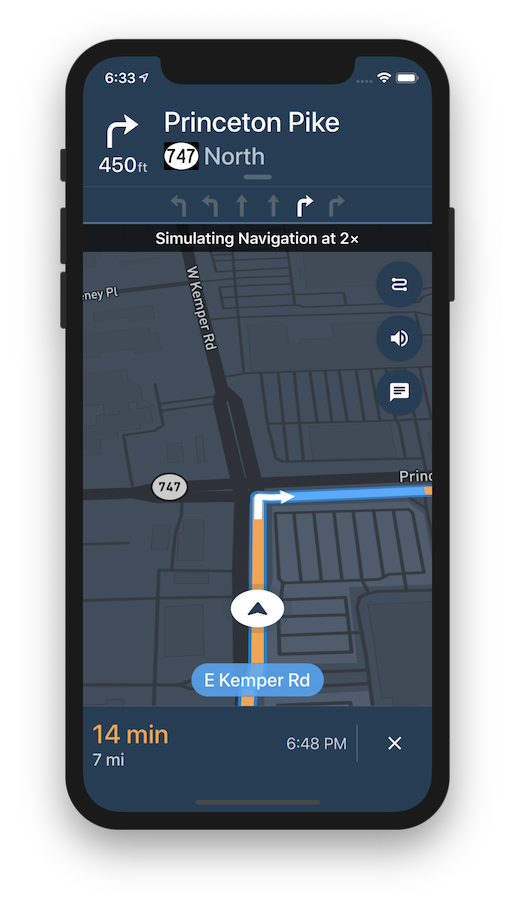
The Mapbox Navigation SDK gives you all the tools you need to add turn-by-turn navigation to your application. It takes just a few minutes to drop a full-fledged turn-by-turn navigation view controller into your application. Or use the Core Navigation framework directly to build something truly custom.
The Mapbox Navigation SDK and Core Navigation are compatible with applications written in Swift 5 in Xcode 10.2. The Mapbox Navigation and Mapbox Core Navigation frameworks run on iOS 10.0 and above.
Installation
Using CocoaPods
To install Mapbox Navigation using CocoaPods:
Create a Podfile with the following specification:
pod 'MapboxNavigation', '~> 1.0'Run
pod repo update && pod installand open the resulting Xcode workspace.
Using Carthage
Alternatively, to install Mapbox Navigation using Carthage:
Create a Cartfile with the following dependency:
github "mapbox/mapbox-navigation-ios" ~> 1.0Run
carthage update --platform iOSto build just the iOS dependencies.Follow the rest of Carthage’s iOS integration instructions. Your application target’s Embedded Frameworks should include
MapboxNavigation.framework,MapboxCoreNavigation.framework, andMapboxNavigationNative.framework.
Configuration
Mapbox APIs and vector tiles require a Mapbox account and API access token. In the project editor, select the application target, then go to the Info tab. Under the “Custom iOS Target Properties” section, set
MGLMapboxAccessTokento your access token. You can obtain an access token from the Mapbox account page.In order for the SDK to track the user’s location as they move along the route, set
NSLocationWhenInUseUsageDescriptionto:Shows your location on the map and helps improve the map.
Users expect the SDK to continue to track the user’s location and deliver audible instructions even while a different application is visible or the device is locked. Go to the Capabilities tab. Under the Background Modes section, enable “Audio, AirPlay, and Picture in Picture” and “Location updates”. (Alternatively, add the
audioandlocationvalues to theUIBackgroundModesarray in the Info tab.)
Now import the relevant modules and present a new NavigationViewController. You can also push to a navigation view controller from within a storyboard if your application’s UI is laid out in Interface Builder.
import MapboxDirections
import MapboxCoreNavigation
import MapboxNavigation
let origin = Waypoint(coordinate: CLLocationCoordinate2D(latitude: 38.9131752, longitude: -77.0324047), name: "Mapbox")
let destination = Waypoint(coordinate: CLLocationCoordinate2D(latitude: 38.8977, longitude: -77.0365), name: "White House")

let options = NavigationRouteOptions(waypoints: [origin, destination])

Directions.shared.calculate(options) { (waypoints, routes, error) in
    guard let route = routes?.first else { return }

    let viewController = NavigationViewController(for: route)
    present(viewController, animated: true, completion: nil)
}
Starting points
This SDK is divided into two frameworks: the Mapbox Navigation framework (MapboxNavigation) is the ready-made turn-by-turn navigation UI, while the Mapbox Core Navigation framework (MapboxCoreNavigation) is responsible for the underlying navigation logic.
Mapbox Navigation
NavigationViewController is the main class that encapsulates the entirety of the turn-by-turn navigation UI, orchestrating the map view, various UI elements, and the route controller. Your application would most likely present an instance of this class. The NavigationViewControllerDelegate protocol allows your application to customize various aspects of the UI and react to location-related events as they occur.
NavigationMapView is the map view at the center of the turn-by-turn navigation UI. You can also use this class independently of NavigationViewController, for example to display a route preview map. The NavigationMapViewDelegate protocol allows your application to customize various aspects of the map view’s appearance.
CarPlayManager is the class that manages the CarPlay screen if your application is CarPlay-enabled. It provides a main map for browsing, a search interface powered by MapboxGeocoder.swift, and a turn-by-turn navigation UI similar to the one provided by NavigationViewController. Your UIApplicationDelegate subclass can conform to the CarPlayManagerDelegate protocol to manage handoffs between NavigationViewController and the CarPlay device, as well as to customize some aspects of the CarPlay navigation experience. To take advantage of CarPlay functionality, your application must have a CarPlay navigation application entitlement and be built in Xcode 10 or above, and the user’s iPhone or iPad must have iOS 12 or above installed.
Core Navigation
MapboxNavigationService is responsible for receiving user location updates and determining their relation to the route line. If you build a completely custom navigation UI, this is the class your code would interact with directly. The NavigationServiceDelegate protocol allows your application to react to location-related events as they occur. Corresponding Notifications from the NavigationService‘s RouteController are also posted to the shared NotificationCenter. These notifications indicate the current state of the application in the form of a RouteProgress object.
For further details, consult the guides and examples included with this API reference. If you have any questions, please see our help page. We welcome your bug reports, feature requests, and contributions.
Changes in version 1.0.0
Packaging
- This SDK can no longer be used in applications written in pure Objective-C. If you need to use this SDK’s public API from Objective-C code, you will need to implement a wrapper in Swift that bridges the subset of the API you need from Swift to Objective-C. (#2230)
- Upgraded to Mapbox Maps SDK for iOS v5.6.x. (#2302)
Top and bottom banners
- Removed
BottomBannerViewController(delegate:)in favor ofBottomBannerViewController()and theBottomBannerViewController.delegateproperty’s setter. (#2297) - Removed the
StatusView.canChangeValueproperty in favor ofStatusView.isEnabled. (#2297) - Fixed an issue where the wrong style was applied to exit numbers in the top banner and for subsequent maneuver banners in CarPlay, resulting in poor contrast. (#2161)
- Fixed an issue where a black background could appear under the arrow in a
ManeuverViewregardless of the view’sbackgroundColorproperty. (#2279)
Map
UserCourseViewis now a type alias of theUIViewclass and theCourseUpdatableprotocol rather than a protocol in its own right. (#2230)- Renamed
NavigationMapView.showRoutes(_:legIndex:)toNavigationMapView.show(_:legIndex:). (#2230) - Renamed
NavigationMapView.showWaypoints(_:legIndex:)toNavigationMapView.showWaypoints(on:legIndex:). (#2230) - Removed the
NavigationMapView.navigationMapDelegateproperty in favor ofNavigationMapView.navigationMapViewDelegate. (#2297) - Added a speed limit indicator to the upper-left corner of the map view during turn-by-turn navigation (upper-right corner in CarPlay). To hide the speed limit indicator, set the
NavigationViewController.showsSpeedLimitsproperty tofalse. To customize the indicator’s colors, configureSpeedLimitView’s appearance proxy inside aStylesubclass. (#2291)
Spoken instructions
- Removed
MapboxVoiceController.play(_:)in favor ofMapboxVoiceController.play(instruction:data:). (#2230, #2297) - The
MapboxVoiceController.speakWithDefaultSpeechSynthesizer(_:error:)andVoiceControllerDelegate.voiceController(_:spokenInstructionsDidFailWith:)methods now accept aSpeechErrorinstance instead of anNSErrorobject. (#2230) - Added the
VoiceControllerDelegate.voiceController(_:didFallBackTo:becauseOf:)method for detecting when the voice controller falls back toAVSpeechSynthesizer. (#2230)
User location
- Removed the
NavigationViewController.routeControllerproperty andLegacyRouteController(along:directions:dataSource:eventsManager:). To useLegacyRouteControllerinstead of the defaultRouteControllerclass, pass that type intoMapboxNavigationService(route:directions:locationSource:eventsManagerType:simulating:routerType:), pass theMapboxNavigationServiceobject intoNavigationOptions(styles:navigationService:voiceController:topBanner:bottomBanner:), and pass theNavigationOptionsobject intoNavigationViewController(route:navigationService:). To accessLegacyRouteController, use theNavigationViewController.navigationServiceandNavigationService.routerproperties and cast the value ofNavigationService.routerto aLegacyRouteController. (#2297) - Removed the
NavigationViewController.locationManagerandLegacyRouteController.locationManagerproperties in favor ofNavigationService.locationManager. (#2297) - Removed
RouteLegProgress.upComingStepin favor ofRouteLegProgress.upcomingStep. (#2297) - Removed the
RouteProgress.nearbyCoordinatesproperty in favor ofRouteProgress.nearbyShape. (#2275, #2275) - Removed the
LegacyRouteController.tunnelIntersectionManagerproperty. (#2297)
Other changes
Since
Since pure Swift protocols cannot have optional methods, various delegate protocols now provide default no-op implementations for all their methods and conform to theUnimplementedLogging protocol, which can inform you at runtime when a delegate method is called but has not been implemented. Messages are sent through Apple Unified Logging and can be disabled globally through Unifed Logging, or by overriding the delegate function with a no-op implementation. (#2230)
- Removed
NavigationViewController(for:styles:navigationService:voiceController:)andNavigationViewController(for:directions:styles:routeController:locationManager:voiceController:eventsManager:)in favor ofNavigationViewController(route:options:). (#2297) - Removed the
EventsManagertype alias in favor of theNavigationEventsManagerclass. (#2297) - Removed the
NavigationViewController.eventsManagerandLegacyRouteController.eventsManagerproperties in favor ofNavigationService.eventsManager. (#2297) - Removed the
NavigationViewController.carPlayManager(_:didBeginNavigationWith:window:delegate:)andNavigationViewController.carPlayManagerDidEndNavigation(_:window:)methods. To mirror CarPlay navigation on the main device, present and dismiss aNavigationViewControllerin theCarPlayManagerDelegate.carPlayManager(_:didBeginNavigationWith:)andCarPlayManagerDelegate.carPlayManagerDidEndNavigation(_:)methods, respectively. (#2297) - When Dark Mode is enabled, user notifications now draw maneuver icons in white instead of black for better contrast. (#2283)
- Added the
RouteLegProgress.currentSpeedLimitproperty. (#2114)