> For the complete documentation index, see [llms.txt](https://docs.mapbox.com/android/navigation/v2/llms.txt)

# Maneuver instructions

The Mapbox Navigation SDK provides information about what action a driver needs to take to get from one step to the next along a route in maneuver instructions. This provides text instructions to your users at defined locations along a user's route.

The Navigation SDK uses the [Mapbox Java SDK's](https://docs.mapbox.com/android/java/guides/) `BannerInstructions` class to hold information about the next step. The information is then used to display instructions on the device's screen. Read more about the information included in the banner instructions object in the [Mapbox Directions API documentation](https://docs.mapbox.com/api/navigation/directions/#banner-instruction-object).

## Use the default maneuver UI component

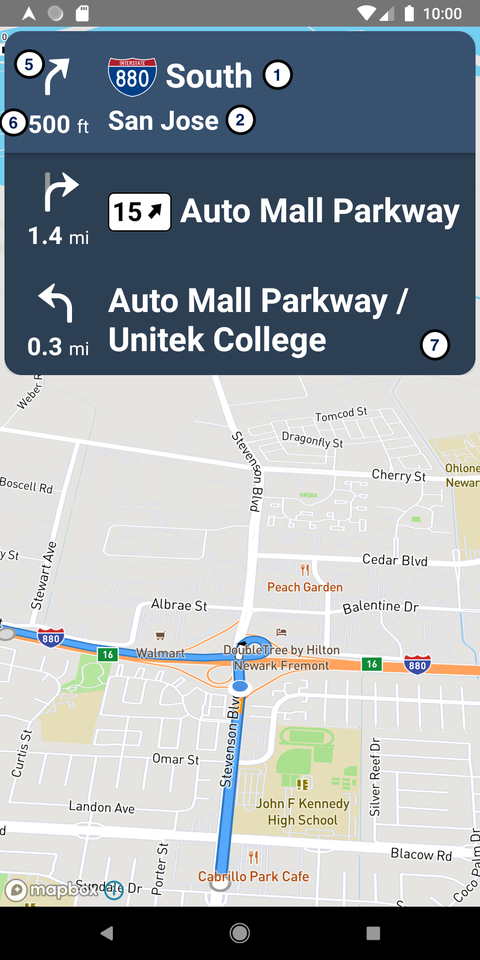
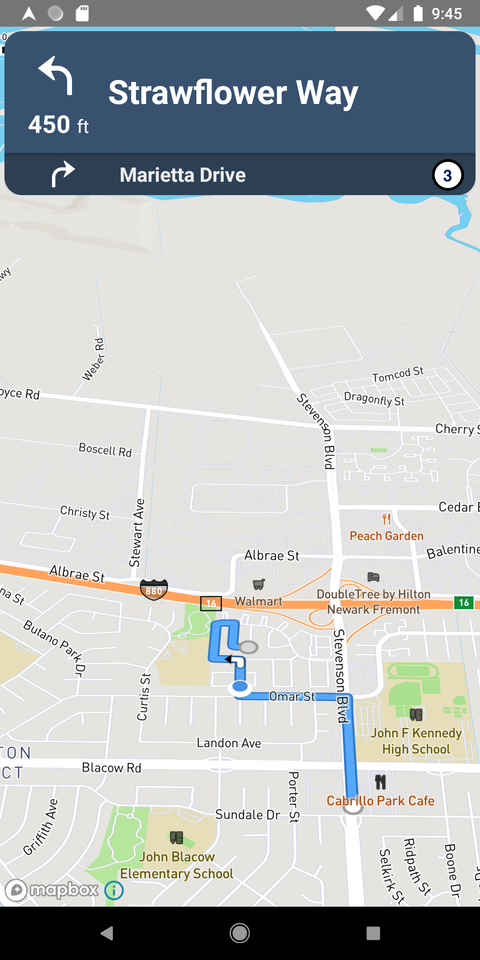
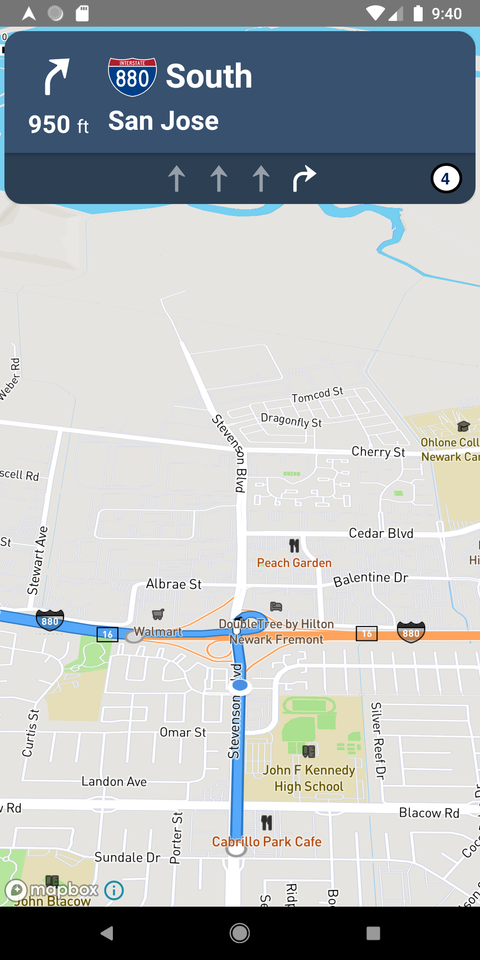
The default maneuver view UI component ([`MapboxManeuverView`](https://docs.mapbox.com/android/navigation/v2/api/2.22.2/libnavui-maneuver/com.mapbox.navigation.ui.maneuver.view/)) available in the Navigation SDK holds the following pieces of information:

-   **Primary maneuver**: Shows the name of the road, freeway, or exit of the next maneuver.
-   **Secondary maneuver (optional)**: Shows more information about the road, freeway, or exit if available.
-   **Sub maneuver (optional)**: Shows the name of the road, freeway, or exit of the maneuver after the next maneuver if it will occur shortly after completing the next maneuver.
-   **Lane guidance (optional)**: Guides the user to drive in the appropriate lane if there are multiple lanes and an upcoming maneuver requires them to be in a specific lane.
-   **Maneuver turn icons**: It shows a maneuver turn icon associated with the maneuver.
-   **Step distance remaining**: Shows the distance remaining to finish the current maneuver.
-   **Upcoming maneuver list**: Shows a list of upcoming maneuvers excluding the current maneuver.

<table><thead><tr><th style="text-align:center">Overview one</th><th style="text-align:center">Overview two</th><th style="text-align:center">Overview three</th></tr></thead><tbody><tr><td style="text-align:center"><img src="https://docs.mapbox.com/android/assets/ideal-img/navigation-maneuver-overview-one.e7e965d.480.png" alt="A Navigation UI displaying the primary maneuver, secondary maneuver, maneuver icons, step distance remaining, and upcoming maneuver list as described above."></td><td style="text-align:center"><img src="https://docs.mapbox.com/android/assets/ideal-img/navigation-maneuver-overview-two.1071ef7.480.png" alt="A Navigation UI displaying a submaneuver as described above."></td><td style="text-align:center"><img src="https://docs.mapbox.com/android/assets/ideal-img/navigation-maneuver-overview-three.b8f0629.480.png" alt="A Navigation UI displaying lane guidance as described above."></td></tr><tr><td style="text-align:center">1: Primary maneuver<br>2: Secondary maneuver<br>5: Maneuver icons<br>6: Step distance remaining<br>7: Upcoming maneuver list</td><td style="text-align:center">3: Sub maneuver</td><td style="text-align:center">4: Lane guidance</td></tr></tbody></table>

> **Related content (example): [Render maneuver instructions for a route](https://docs.mapbox.com/android/navigation/v2/examples/show-maneuvers/)**
> 
> Draw maneuver instructions using the Maneuver API and `MapboxManeuverView`.

### Add the view to the layout

Add the `MapboxManeuverView` to your XML layout.

```XML
<com.mapbox.navigation.ui.maneuver.view.MapboxManeuverView
      android:id="@+id/maneuverView"
      android:layout_width="0dp"
      android:layout_height="wrap_content"
      android:layout_margin="4dp"
      app:layout_constraintEnd_toEndOf="parent"
      app:layout_constraintStart_toStartOf="parent"
      app:layout_constraintTop_toTopOf="parent"
      />
```

### Create an instance of the Maneuver API

The Maneuver API generates representation of maneuvers based on `BannerInstructions` found in the `DirectionsRoute` object.

You'll use several functions that belong to the Maneuver API in your activity to get the most up to date information about maneuvers and display that information in your application. Before you can access those functions, you need to create an instance of the [`MapboxManeuverApi`](https://docs.mapbox.com/android/navigation/v2/api/2.22.2/libnavui-maneuver/com.mapbox.navigation.ui.maneuver.api/-mapbox-maneuver-api/).

`MapboxManeuverApi` takes a [`MapboxDistanceFormatter`](https://docs.mapbox.com/android/navigation/v2/api/2.22.2/libnavigation-core/com.mapbox.navigation.core.formatter/-mapbox-distance-formatter/) that gives options to format the distance so you'll also have to define [`DistanceFormatterOptions`](https://docs.mapbox.com/android/navigation/v2/api/2.22.2/libnavigation-base/com.mapbox.navigation.base.formatter/-distance-formatter-options/) to pass to the API.

```kotlin
// Define distance formatter options
private val distanceFormatter: DistanceFormatterOptions by lazy {
    DistanceFormatterOptions.Builder(this).build()
}
// Create an instance of the Maneuver API
private val maneuverApi: MapboxManeuverApi by lazy {
    MapboxManeuverApi(MapboxDistanceFormatter(distanceFormatter))
}
```

### Create an instance of the maneuver view

Once you have added the view to the XML layout file, reference it in your Activity or Fragment.

```kotlin
private var maneuverView: MapboxManeuverView? = null
override fun onCreate() {
  ...
  maneuverView = findViewById(R.id.maneuverView)
}
```

### Start and stop receiving route progress events

Once you've instantiated the Maneuver API, add the code below to start receiving route progress events.

```kotlin
// Listen for updates to route progress
private val routeProgressObserver = object : RouteProgressObserver {
    override fun onRouteProgressChanged(routeProgress: RouteProgress) {
    }
}
```

When using [`RouteProgressObserver`](https://docs.mapbox.com/android/navigation/v2/api/2.22.2/libnavigation-core/com.mapbox.navigation.core.trip.session/-route-progress-observer/), you also need to register and unregister the observer in the appropriate place.

```kotlin
override fun onStart() {
    super.onStart()
    mapboxNavigation.registerRouteProgressObserver(routeProgressObserver)
}
override fun onStop() {
    super.onStop()
    mapboxNavigation.unregisterRouteProgressObserver(routeProgressObserver)
}
```

Don't forget to cancel any potential in-flight `MapboxManeuverApi` requests in `onStop` or `onDestroy`:

```kotlin
override fun onDestroy() {
    super.onDestroy()
    maneuverApi.cancel()
}
```

### Display primary, secondary, sub maneuver, lane guidance, and step distance

Once you have registered the [`RouteProgressObserver`](https://docs.mapbox.com/android/navigation/v2/api/2.22.2/libnavigation-core/com.mapbox.navigation.core.trip.session/-route-progress-observer/), you need to invoke the API inside the observer to receive updated banner instruction data any time the route progress changes.

```kotlin
private val routeProgressObserver = object : RouteProgressObserver {
    override fun onRouteProgressChanged(routeProgress: RouteProgress) {
        val maneuvers = maneuverApi.getManeuvers(routeProgress, callback)
        maneuverView.renderManeuvers(maneuvers)
    }
}
```

`MapboxManeuverView` uses the first item in this list to render the current maneuver and rest of the items in the list is displayed as upcoming maneuvers. The maneuver information returned does not contain data related to road shield. The data is returned in the form of `Expected`, which either contains [`ManeuverError`](https://docs.mapbox.com/android/navigation/v2/api/2.22.2/libnavui-maneuver/com.mapbox.navigation.ui.maneuver.model/-maneuver-error/) or a list of [`Maneuver`](https://docs.mapbox.com/android/navigation/v2/api/2.22.2/libnavui-maneuver/com.mapbox.navigation.ui.maneuver.model/-maneuver/)s.

```kotlin
val maneuvers = maneuverApi.getManeuvers(routeProgress)
maneuverView.renderManeuvers(maneuvers)
```

### Display road shield

After you have received the data without the road shield, if you would like to render a [`RoadShield`](https://docs.mapbox.com/android/navigation/v2/api/2.22.2/libnavui-maneuver/com.mapbox.navigation.ui.maneuver.model/-road-shield/), invoke the API inside the success block to receive an updated list of `Maneuver`s with the road shield data.

```kotlin
private val routeProgressObserver = object : RouteProgressObserver {
    override fun onRouteProgressChanged(routeProgress: RouteProgress) {
        val maneuvers = maneuverApi.getManeuvers(routeProgress, callback)
        maneuverView.renderManeuvers(maneuvers)
        maneuvers.fold(
            { error ->
                // handle errors
            },
            { maneuverList ->
                maneuverApi.getRoadShields(maneuverList, roadShieldCallback)
            }
    }
}
```

Add the following callback that holds the information containing a list of all the maneuvers with road shields in a route leg.

```kotlin
private val roadShieldCallback = object : RoadShieldCallback {
    override fun onRoadShields(
        maneuvers: List<Maneuver>,
        shields: Map<String, RoadShield?>,
        errors: Map<String, RoadShieldError>
    ) {
        maneuverView.renderManeuverShields(shields)
    }  
}
```

You should assign `MapboxManeuverView` a visibility value of either `GONE` or `INVISIBLE` by default and change it to `VISIBLE` only when the first maneuver data is available.

## Customize maneuver instructions

To use a different set of colors and text properties, you can customize them in [`MapboxManeuverView`](https://docs.mapbox.com/android/navigation/v2/api/2.22.2/libnavui-maneuver/com.mapbox.navigation.ui.maneuver.view/). The Mapbox Navigation SDK defines a custom set of properties for `MapboxManeuverView`.

```XML
<declare-styleable name="MapboxManeuverView">
    {/* Defines the background color of MapboxManeuverView showing the primary and secondary maneuvers as well as step distance remaining and maneuver turn icon */}
    <attr name="maneuverViewBackgroundColor" format="reference|color"/>
    {/* Defines the background color of MapboxManeuverView sub instructions and turn icon */}
    <attr name="subManeuverViewBackgroundColor" format="reference|color"/>
    {/* Defines the background color of upcoming maneuvers */}
    <attr name="upcomingManeuverViewBackgroundColor" format="reference|color"/>
    {/* Defines the style of maneuver arrow in the primary and sub maneuver view */}
    <attr name="maneuverViewIconStyle" format="reference" />
    {/* Defines the style of maneuver arrow in the lane guidance view */}
    <attr name="laneGuidanceManeuverIconStyle" format="reference" />
  </declare-styleable>
```

### Change the background color

Define a custom style for `MapboxManeuverView` in your `styles.xml` file.

```XML
<style name="MapboxCustomManeuverStyle" parent="MapboxStyleManeuverView">
    <item name="maneuverViewBackgroundColor">#058A0A</item>
    <item name="subManeuverViewBackgroundColor">#046808</item>
    <item name="upcomingManeuverViewBackgroundColor">#046808</item>
</style>
```

Then, add this style to the XML layout file where you have put your `MapboxManeuverView`.

```XML
<com.mapbox.navigation.ui.maneuver.view.MapboxManeuverView
      android:id="@+id/maneuverView"
      android:layout_width="0dp"
      android:layout_height="wrap_content"
      android:layout_margin="4dp"
      style="@style/MapboxCustomManeuverStyle"
      app:layout_constraintEnd_toEndOf="parent"
      app:layout_constraintStart_toStartOf="parent"
      app:layout_constraintTop_toTopOf="parent"
      />
```

| Example: MapboxManeuverView customization | Example: Upcoming maneuver list customization |
| --- | --- |
|  |  |
| ![screenshot of navigation maneuver background customization](https://docs.mapbox.com/android/assets/ideal-img/navigation-maneuver-background-customization.f9c6d16.480.png) | ![screenshot of navigation upcoming maneuver background customization](https://docs.mapbox.com/android/assets/ideal-img/navigation-upcoming-maneuver-background-customization.38a5ca4.480.png) |

### Change the color of maneuver turn icons

Define a custom style for maneuver turn icons in your `styles.xml` file.

```XML
<style name="MapboxCustomManeuverTurnIconStyle" parent="MapboxStyleTurnIconManeuver">
    <item name="maneuverTurnIconColor">#FFEB3B</item>
    <item name="maneuverTurnIconShadowColor">#7A6E03</item>
</style>

<style name="MapboxCustomManeuverStyle" parent="MapboxStyleManeuverView">
    <item name="maneuverViewBackgroundColor">#058A0A</item>
    <item name="subManeuverViewBackgroundColor">#046808</item>
    <item name="upcomingManeuverViewBackgroundColor">#046808</item>
    <item name="maneuverViewIconStyle">@style/MapboxCustomManeuverTurnIconStyle</item>
    <item name="laneGuidanceManeuverIconStyle">@style/MapboxCustomManeuverTurnIconStyle</item>
</style>
```

Then, add this style to the XML layout file where you have put your `MapboxManeuverView`.

```XML
<com.mapbox.navigation.ui.maneuver.view.MapboxManeuverView
      android:id="@+id/maneuverView"
      android:layout_width="0dp"
      android:layout_height="wrap_content"
      android:layout_margin="4dp"
      style="@style/MapboxCustomManeuverStyle"
      app:layout_constraintEnd_toEndOf="parent"
      app:layout_constraintStart_toStartOf="parent"
      app:layout_constraintTop_toTopOf="parent"
      />
```

| Example: MapboxTurnIconManeuver icon color customization |
| --- |
| ![screenshot of navigation maneuver icon customization](https://docs.mapbox.com/android/assets/ideal-img/navigation-maneuver-icon-customization.08918ae.480.png) |

### Change the text properties

To change the textual property of primary, secondary, and sub maneuvers, define the text appearance in your `styles.xml` file.

```XML
<style name="ManeuverTextAppearance" parent="TextAppearance.AppCompat">
    <item name="android:textColor">#FFC107</item>
    // Similarly you can add any other android text view property here
</style>
```

Then, invoke the API in your activity to use the style defined above.

```kotlin
maneuverView.updatePrimaryManeuverTextAppearance(R.style.ManeuverTextAppearance)
maneuverView.updateSecondaryManeuverTextAppearance(R.style.ManeuverTextAppearance)
maneuverView.updateSubManeuverTextAppearance(R.style.ManeuverTextAppearance)
```

You can use the same text appearance or can define different appearances for different levels of maneuvers.

| Example: Primary & sub maneuver color customization | Example: Secondary maneuver color customization |
| --- | --- |
|  |  |
| ![screenshot of navigation maneuver text customization](https://docs.mapbox.com/android/assets/ideal-img/navigation-maneuver-text-customization-one.c50890e.480.png) | ![screenshot of navigation maneuver text customization](https://docs.mapbox.com/android/assets/ideal-img/navigation-maneuver-text-customization-two.16930a2.480.png) |

Similarly you can define the text appearance for step distance remaining in your `styles.xml` file and invoke the following API to change the text appearance.

```kotlin
maneuverView.updateStepDistanceTextAppearance(R.style.MyStepDistanceRemainingAppearance)
```

| Example: Step distance remaining color customization |
| --- |
| ![screenshot of step distance remaining text customization](https://docs.mapbox.com/android/assets/ideal-img/navigation-step-distance-remaining-text-customization.e4ca632.480.png) |

You can also change the text appearance of upcoming maneuvers in the upcoming maneuver list in your `styles.xml` file.

```XML
<style name="UpcomingManeuverTextAppearance" parent="TextAppearance.AppCompat">
    <item name="android:textSize">24sp</item>
    // Similarly you can add any other android text view property here
</style>
```

Then, invoke the API in your activity to use the style defined above.

```kotlin
maneuverView.updateUpcomingPrimaryManeuverTextAppearance(R.style.UpcomingManeuverTextAppearance)
maneuverView.updateUpcomingSecondaryManeuverTextAppearance(R.style.UpcomingManeuverTextAppearance)
maneuverView.updateUpcomingManeuverStepDistanceTextAppearance(R.style.UpcomingManeuverTextAppearance)
```

| Example: Upcoming maneuver list text and icon customization |
| --- |
| ![screenshot of upcoming maneuver text customization](https://docs.mapbox.com/android/assets/ideal-img/navigation-upcoming-maneuver-text-customization.b6d436b.480.png) |

All the customization options mentioned above involve interaction with `MapboxManeuverView`. If you don't wish to use `MapboxManeuverView` and its layout design, you can arrange the individual views in your customized layout. This allows you to decide the placement of individual views and control their appearance.

## Use subviews for further customization

The maneuver view UI component, `MapboxManeuverView`, includes several subviews that are also available to use directly. If you use `MapboxManeuverView` in your application, you don't have to add these subviews directly, but if you want complete control over how and where the content in each subview appears in your application, you can use them directly instead of via `MapboxManeuverView`. Add one or more of the following `View`s to your application's layout, and use the Maneuver API to request maneuvers and render them on top of your map.

### Primary maneuver

The [`MapboxPrimaryManeuver`](https://docs.mapbox.com/android/navigation/v2/api/2.22.2/libnavui-maneuver/com.mapbox.navigation.ui.maneuver.view/-mapbox-primary-maneuver/) view can consist of all or some of the following pieces of information:

-   Exit number
-   Text containing the road name
-   Road shield containing the name and optional shield icon

`MapboxPrimaryManeuver` will be included using default configuration and displaying data from the `BannerInstructions.primary()` field.

| Example: Road shield and text | Example: Exit number and text |
| --- | --- |
| ![screenshot of primary maneuver overview one](https://docs.mapbox.com/android/assets/ideal-img/navigation-primary-maneuver-overview-one.d23cc0c.480.png) | ![screenshot of primary maneuver overview two](https://docs.mapbox.com/android/assets/ideal-img/navigation-primary-maneuver-overview-two.0307bfe.480.png) |

### Secondary maneuver

The [`MapboxSecondaryManeuver`](https://docs.mapbox.com/android/navigation/v2/api/2.22.2/libnavui-maneuver/com.mapbox.navigation.ui.maneuver.view/-mapbox-secondary-maneuver/) view provides additional context to the primary maneuver element. The content included in the secondary maneuver can consist of all or some of the following pieces of information:

-   Exit number
-   Text containing the road name
-   Road shield containing the name and optional shield icon

`MapboxSecondaryManeuver` will be included using default configuration and displaying data from the `BannerInstructions.secondary()` field.

| Example: Text containing road name |
| --- |
| ![screenshot of secondary maneuver overview](https://docs.mapbox.com/android/assets/ideal-img/navigation-secondary-maneuver-overview.2642e28.480.png) |

### Sub maneuver

The [`MapboxSubManeuver`](https://docs.mapbox.com/android/navigation/v2/api/2.22.2/libnavui-maneuver/com.mapbox.navigation.ui.maneuver.view/-mapbox-sub-maneuver/) view provides a preview of the maneuver that is coming up next after the one described in the primary maneuver. The component will only show a sub maneuver if the next maneuver will occur shortly after completing the primary maneuver. The content in the sub maneuver can consist of all or some of the following pieces of information:

-   Exit number
-   Text containing the road name
-   Road shield containing the name and optional shield icon

`MapboxSubManeuver` will be included using default configuration and displaying data from the `BannerInstructions.sub()` field of the type text.

| Example: Road shield and text |
| --- |
| ![screenshot of sub maneuver overview](https://docs.mapbox.com/android/assets/ideal-img/navigation-sub-maneuver-overview.6473bdc.480.png) |

> **Note**
> 
> Since the information for both sub maneuver and land guidance are associated with the same object, `BannerInstructions.sub`, both of these cannot exist at the same time. If lane information is available, that takes precedence over information about the next maneuver.

### Lane guidance

The [`MapboxLaneGuidanceAdapter`](https://docs.mapbox.com/android/navigation/v2/api/2.22.2/libnavui-maneuver/com.mapbox.navigation.ui.maneuver.view/-mapbox-lane-guidance-adapter/) and [`MapboxLaneGuidance`](https://docs.mapbox.com/android/navigation/v2/api/2.22.2/libnavui-maneuver/com.mapbox.navigation.ui.maneuver.view/-mapbox-lane-guidance/) views describe the available turn lanes at an intersection and guides the user to drive in the appropriate lane if the upcoming maneuver requires them to be in a specific lane. Lane guidance turn lane indicators are provided in the order they appear on the street, from left to right.

`MapboxLaneGuidanceAdapter` and `MapboxLaneGuidance` will be included using default configuration and displaying data from the `BannerInstructions.sub()` field of the type lane.

| Example: Turn lanes |
| --- |
| ![screenshot of lane guidance overview](https://docs.mapbox.com/android/assets/ideal-img/navigation-lane-guidance-overview.352135b.480.png) |

> **Note**
> 
> Since the information for both sub maneuver and lane guidance are associated with the same object, `BannerInstructions.sub`, both of these cannot exist at the same time. If lane information is available, that takes precedence over information about the next maneuver.

### Maneuver turn icons

The [`MapboxTurnIconManeuver`](https://docs.mapbox.com/android/navigation/v2/api/2.22.2/libnavui-maneuver/com.mapbox.navigation.ui.maneuver.view/-mapbox-turn-icon-maneuver/) view is used to provide visual clues about turn direction to the text associated with primary and sub maneuver instructions. These icons are displayed in conjunction with `MapboxPrimaryManeuver` and `MapboxSubManeuver`.

`MapboxTurnIconManeuver` will be included using default configuration and displaying data from the `BannerInstructions.primary().modifier()` and `BannerInstructions.sub().modifier()` field.

| Example: Maneuver icon |
| --- |
| ![screenshot of maneuver icon overview](https://docs.mapbox.com/android/assets/ideal-img/navigation-maneuver-icon-overview.efa2497.480.png) |

### Step distance

The [`MapboxStepDistance`](https://docs.mapbox.com/android/navigation/v2/api/2.22.2/libnavui-maneuver/com.mapbox.navigation.ui.maneuver.view/-mapbox-step-distance/) view provides additional context to the primary maneuver. It denotes the distance remaining to finish the current step or before the beginning of next maneuver or the total step distance for the upcoming maneuver. It makes use of appropriate formatting classes to format the distance value in miles (mi) or kilometers (km) based on the geography.

`MapboxStepDistance` will be included using default configuration and displaying data from the `RouteStepProgress.distanceRemaining()` field, which is obtained from `RouteProgress`.

| Example: Step distance remaining in miles |
| --- |
| ![screenshot of step distance remaining overview](https://docs.mapbox.com/android/assets/ideal-img/navigation-step-distance-remaining-overview.a6a7cd4.480.png) |

### Upcoming maneuver list

The [`MapboxUpcomingManeuverAdapter`](https://docs.mapbox.com/android/navigation/v2/api/2.22.2/libnavui-maneuver/com.mapbox.navigation.ui.maneuver.view/-mapbox-upcoming-maneuver-adapter/) view shows all the maneuvers between the current maneuver and the destination. Each upcoming maneuver in the list contains the following sub views:

-   **`MapboxStepDistance`**: Total step distance of this maneuver
-   **`MapboxTurnIconManeuver`**: Maneuver turn icon
-   **`MapboxPrimaryManeuver`**: Primary maneuver
-   **`MapboxSecondaryManeuver`**: Secondary maneuver

`MapboxUpcomingManeuverAdapter` will be included using default configuration and displaying data from the `RouteLeg.steps()` field.

| Example: Upcoming maneuver list |
| --- |
| ![screenshot of upcoming maneuver overview](https://docs.mapbox.com/android/assets/ideal-img/navigation-upcoming-maneuver-overview.4575a2b.480.png) |